Duy Vu
October 11, 2025
•
28 mins read

Retool is one of the most powerful tools for building internal software without writing everything from scratch. But while its drag-and-drop interface and integration options are impressive, one question keeps coming up — how exactly does Retool pricing work?
This guide breaks down how Retool charges teams, what affects the cost, how user types change your bill, and how to estimate your total pricing with a simple slider tool.
Retool’s pricing isn’t a one-size-fits-all setup. It scales with how your company uses the platform — mainly based on user type, plan, and usage level.
At a high level, Retool offers four main pricing tiers:
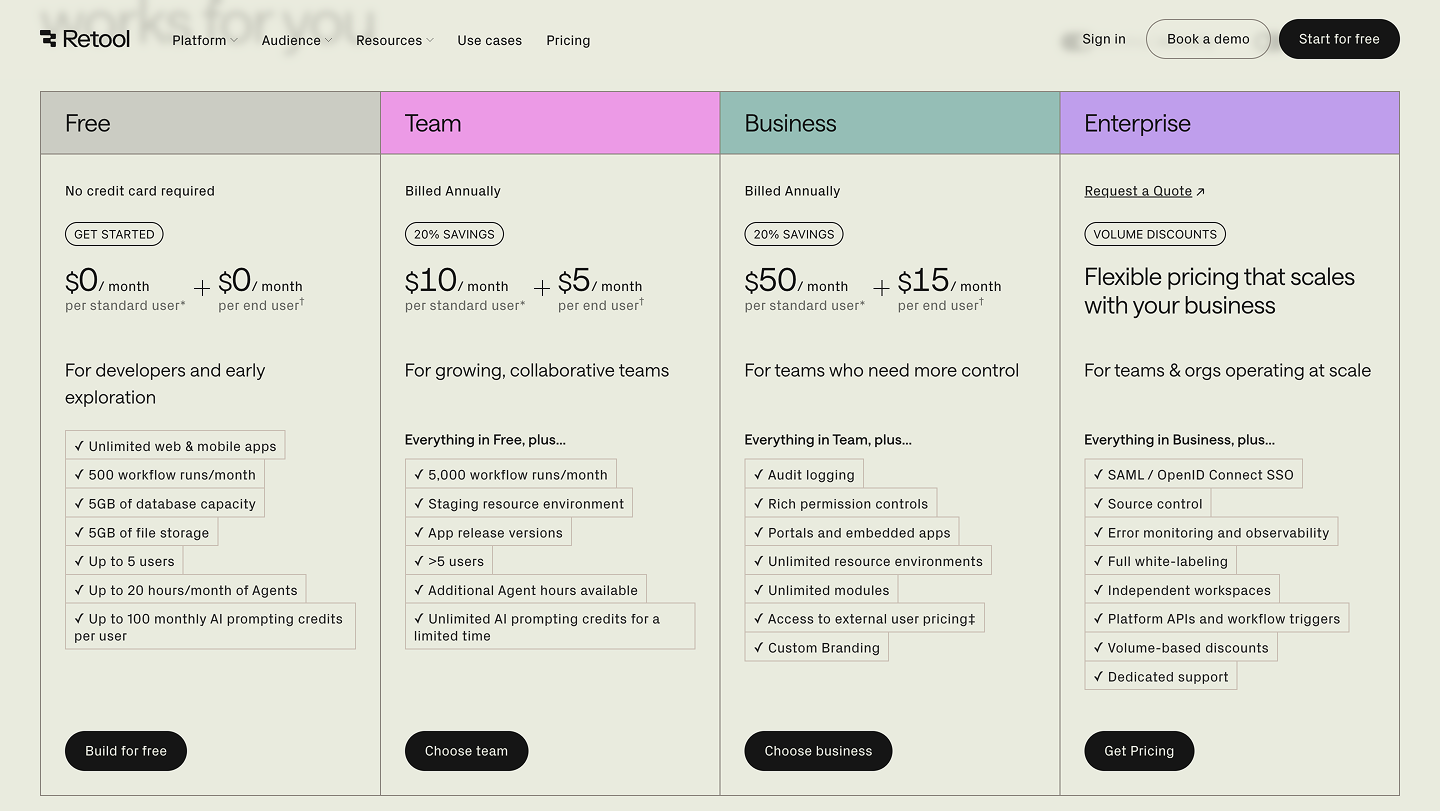
Each plan unlocks different levels of control, hosting, and user management, so it’s important to know which type of users you’ll have in your apps before estimating your cost.
When people talk about Retool pricing, they often overlook the biggest factor — user types.
Retool doesn’t just charge per seat; it charges based on how users interact with your apps.
Here’s what that means in practice:
These are your builders — the people who actually design, edit, and deploy apps inside Retool.
Example:
Your data analyst who builds a sales dashboard or your ops engineer setting up workflows — both are Standard Users.
End users are the people who use the apps built in Retool but don’t edit them.
Example:
A marketing manager checking campaign performance, or an HR staff approving requests inside a dashboard — both count as End Users.
These are users outside your organization — clients, partners, or vendors who need to access Retool-built tools.
Example:
A logistics client tracking order status or a vendor submitting invoices via your custom app.
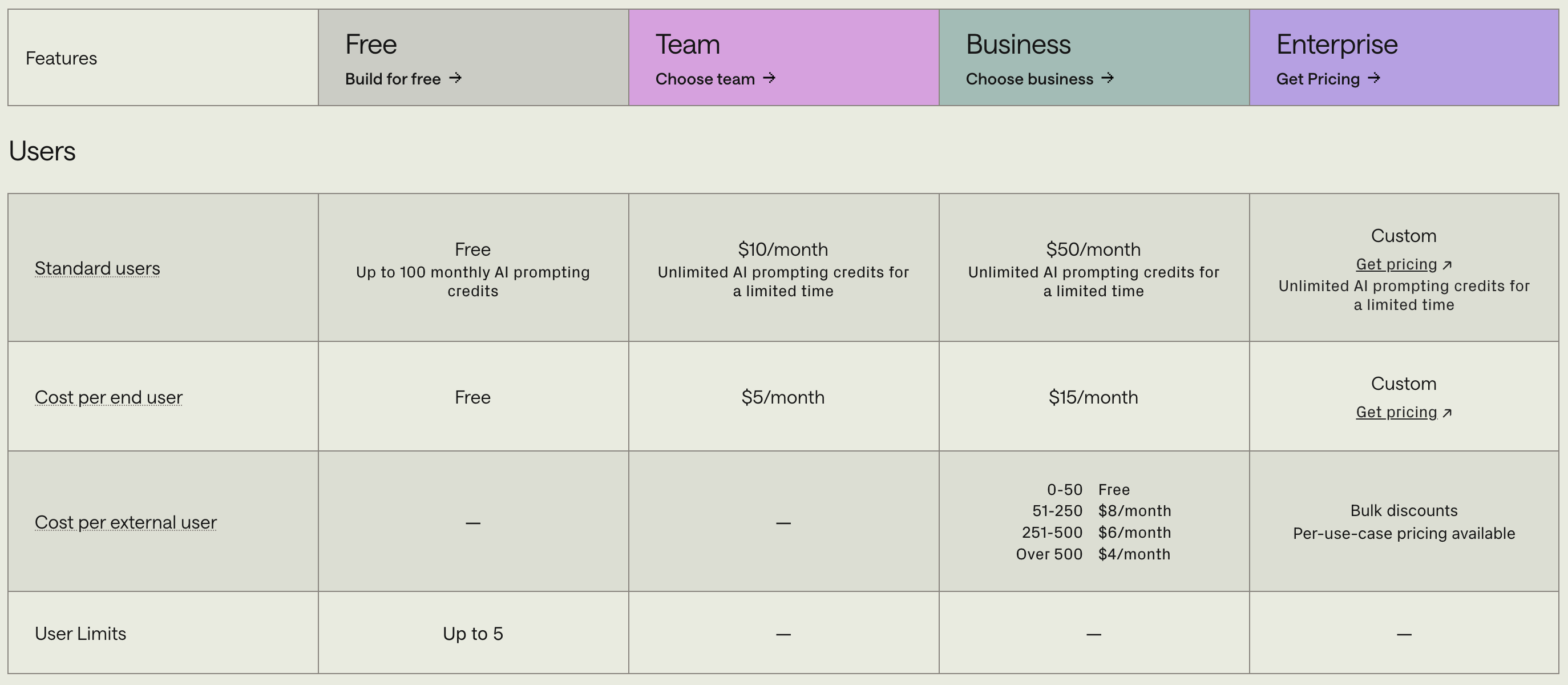
Understanding these three user types is key to accurately predicting your total Retool cost.
The Team Plan is Retool’s entry-level paid plan. It’s built for small teams ready to move past the limitations of the free tier.
Here’s what you get:
You’ll also start seeing more billing cycle options — monthly or annual — with slight discounts for annual payments.
If you’re building multiple apps and need more structured permission controls between team members, the Team Plan is the logical next step.
Once your organization starts deploying apps across departments or externally, Business and Enterprise Plans become essential.
This plan is designed for fast-scaling teams that want to automate workflows, control access, and collaborate securely.
Key features include:
The business and enterprise plans pricing model revolves around predictable costs while maintaining flexibility for different user types.
For larger organizations, compliance and security take priority.
Enterprise pricing includes everything from the Business plan plus:
These plans are designed to be cost effective for large teams who rely heavily on Retool for daily operations, automation, and analytics.
Retool bills based on two main components:
You can choose between monthly or annual billing cycles, depending on how you want to manage your software budget.
If your company expects frequent changes in team size, go with monthly. If you’re scaling consistently, annual plans are more cost effective.
To help you estimate how much you’ll actually pay for Retool, we’ve built an interactive slider app that lets you choose:
You’ll instantly see your estimated monthly cost update in real time.
Use this tool to understand how different user types and enterprise prices affect your total cost.
If you’re comparing Retool alternatives like Budibase, Appsmith, or Superblocks, pricing can differ in structure — especially around user seats.
While Retool’s pricing may seem higher at first, it reflects the platform’s robust security, scalability, and pre-built integrations.
You can check out our in-depth comparison of Retool vs Budibase here.
If you prefer visuals, we’ve summarized Retool’s pricing model in a short video that breaks down how plans and users work.
[Embed: Gemini Veo Video Here]
This quick explainer helps you understand how each plan fits your business size and what you actually pay for.
In most cases, yes. Retool saves engineering time by giving teams the power to build custom software that integrates with APIs, databases, and cloud tools in hours instead of weeks.
When you factor in developer time and operational costs, even the enterprise prices become cost effective.
So whether you’re building internal dashboards or external client apps, the right plan depends on how many users you have and how much customization you need.
Retool’s pricing might look complex at first glance, but once you break it down by user types, plan level, and billing cycle, it’s straightforward.
If you’re unsure where to start, try our slider tool above to estimate your cost, or reach out to our team for a personalized recommendation.
Get a Quote and start building custom internal tools that scale with your business.
Looking to supercharge your operations? We’re masters in Retool and experts at building internal tools, dashboards, admin panels, and portals that scale with your business. Let’s turn your ideas into powerful tools that drive real impact.
Curious how we’ve done it for others? Explore our Use Cases to see real-world examples, or check out Our Work to discover how we’ve helped teams like yours streamline operations and unlock growth.
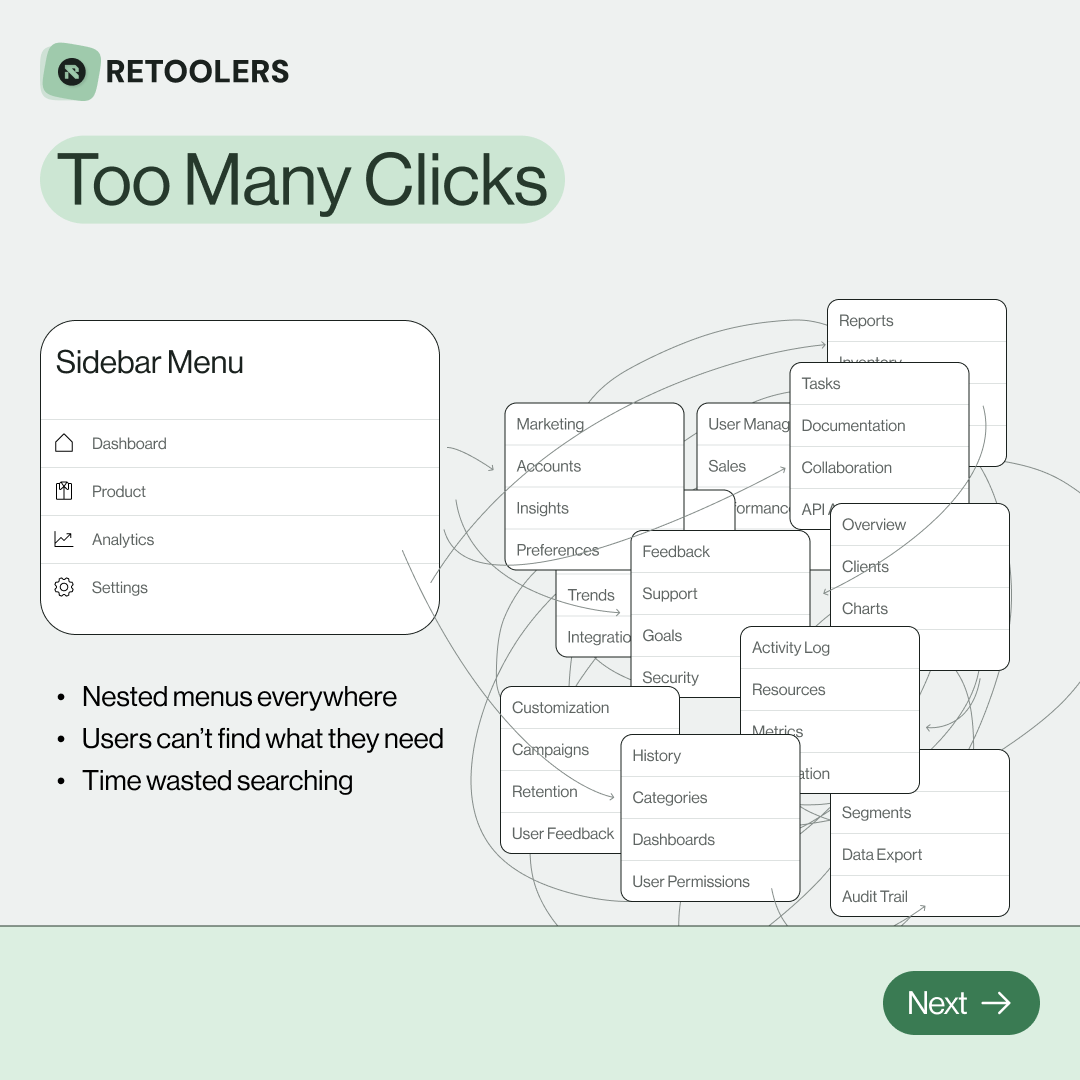
🔎 Internal tools often fail because of one simple thing: Navigation.
Too many clicks, buried menus, lost users.
We broke it down in this 4-slide carousel:
1️⃣ The problem (too many clicks)
2️⃣ The fix (clear navigation structure)
3️⃣ The Retool advantage (drag-and-drop layouts)
4️⃣ The impact (happier teams)
💡 With Retool, you can design internal tools that are easy to use, fast to build, and simple to maintain.
👉 Swipe through the carousel and see how better UX = better productivity.
📞 Ready to streamline your tools? Book a call with us at Retoolers.

🚀From idea → app in minutesBuilding internal tools used to take weeks.
Now, with AI App Generation in Retool, you can describe what you want in plain English and let AI do the heavy lifting.
At Retoolers, we help teams move faster by combining AI + Retool to create tools that actually fit their workflows.
👉 Check out our blog for the full breakdown: https://lnkd.in/gMAiqy9F
Before we quote, we help you clarify the workflow. Share your idea, process, or existing tools, and we’ll map the key requirements, suggest the right system, and create a free wireframe so you can see the solution before development starts.